Go 开发极简 CTF 平台
写在前面:感觉自己还是少了些开发经验,于是,,我就浅浅开发一下吧,一个极简的CTF平台,代码存在:
用到的技术栈:
- 前端:Vue
- 后端:go (gin,gorm)
- 数据库:Sqlite3 (轻量)
- 中间件:Nginx(反代 –> 前后端分离)
效果
Waiting to be perfected

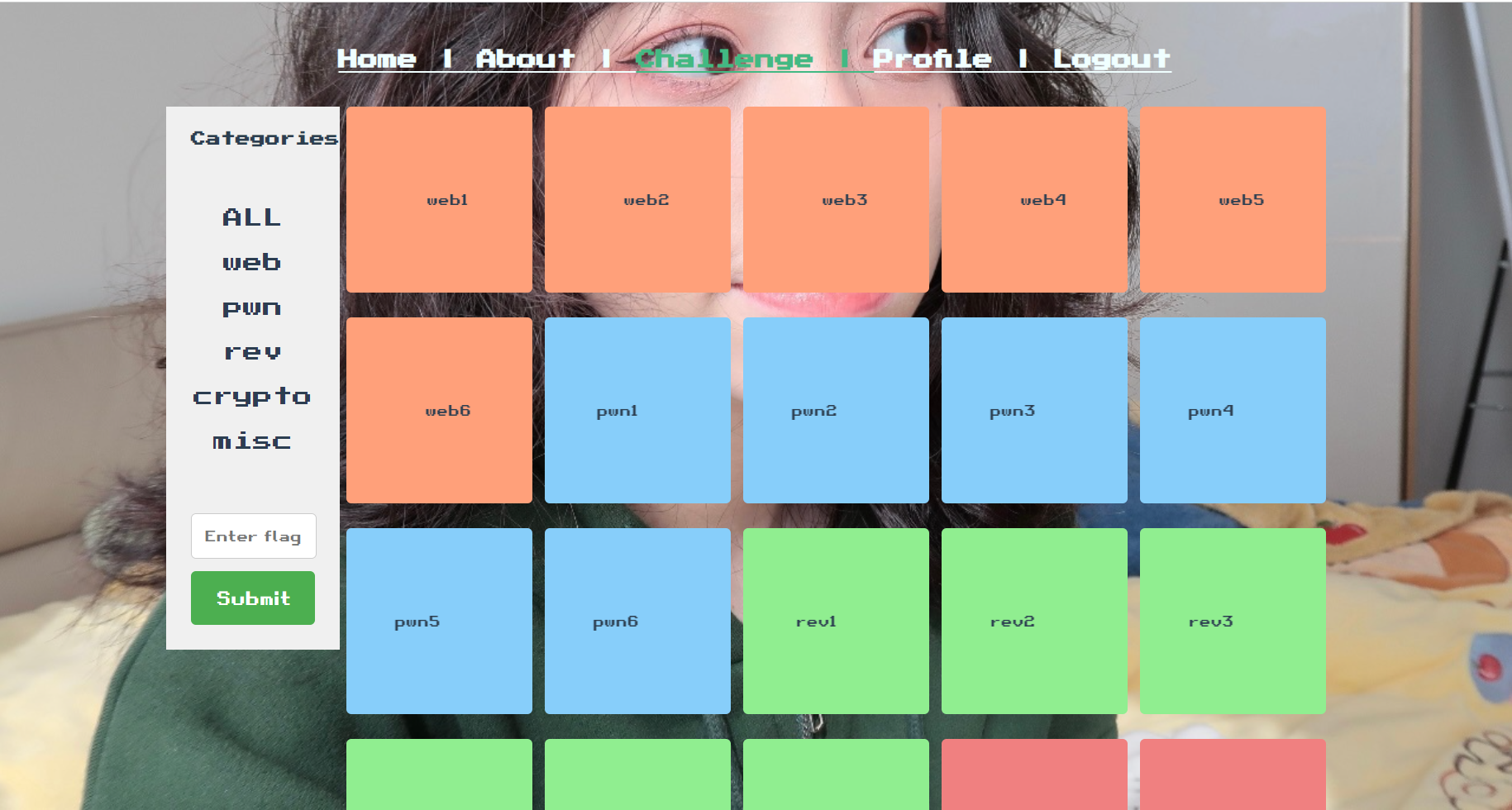
Day 1
web 本质
一个请求对应一个响应
 1
 2
 3
 4
 5
 6
 7
 8
 9
10
11
12
13
14
15
16
17
18
19
20
21
22
| // main.go
package main
import (
"fmt"
"io/ioutil"
"net/http"
)
func sayHello(w http.ResponseWriter, r *http.Request) {
b, _ := ioutil.ReadFile("./hello.txt")
_, _ = fmt.Fprintln(w, string(b))
}
func main() {
http.HandleFunc("/hello", sayHello)
err := http.ListenAndServe(":8080", nil)
if err != nil {
fmt.Printf("http server failed, err:%v\n", err)
return
}
}
|
1
2
3
4
5
6
7
8
9
| // hello.txt
<h1>hello world!!<h1>
<img id="i1" src="https://encrypted-tbn2.gstatic.com/shopping?q=tbn:ANd9GcTF0iWg71eBffc0Yl28bh_5dqPPxjMZVjhZFl_tvhFoDP54SyOx7NL-3zf7Nxoc87b-8XYk5psTdyXxBAF8nWWfyqz2qqMuf2ABK_Ol3BiObaeyMPkbMpJd1g&usqp=CAE">
<button id="b1">click me</button>
<script>
document.getElementById("b1").onclick = function(){
document.getElementById("i1").src = "https://cdn.shopify.com/s/files/1/0683/0194/7201/products/20220712_249_900x.jpg?v=1675412285";
}
</script>
|
gin框架初识
下载并安装
1
| go get -u github.com/gin-gonic/gin
|
 1
 2
 3
 4
 5
 6
 7
 8
 9
10
11
12
13
14
15
16
17
18
19
20
21
22
23
24
25
26
27
28
29
30
31
32
33
34
35
36
37
38
39
| package main
import (
"github.com/gin-gonic/gin"
)
func sayHello(c *gin.Context) {
c.JSON(200, gin.H{
"message": "hello goland",
})
}
func main() {
r := gin.Default() //返回默认路由引擎
r.GET("/hello", sayHello)
// RESTful API风格
r.GET("/book", func(c *gin.Context) {
c.JSON(200, gin.H{
"method": "GET",
})
})
r.POST("/book", func(c *gin.Context) {
c.JSON(200, gin.H{
"method": "POST",
})
})
r.PUT("/book", func(c *gin.Context) {
c.JSON(200, gin.H{
"method": "PUT",
})
})
r.DELETE("/book", func(c *gin.Context) {
c.JSON(200, gin.H{
"method": "DELETE",
})
})
r.Run(":9090")
}
|
HTML渲染
template
 1
 2
 3
 4
 5
 6
 7
 8
 9
10
11
12
13
14
15
16
17
18
19
20
21
22
23
24
25
26
27
28
| package main
import (
"fmt"
"html/template"
"net/http"
)
func main() {
http.HandleFunc("/", func(w http.ResponseWriter, r *http.Request) {
// 解析模板
t, err := template.ParseFiles("./hello.tmpl")
if err != nil {
fmt.Println("Failed: %v", err)
return
}
err = t.Execute(w, "L1ao")
if err != nil {
fmt.Println("Failed: %v", err)
return
}
})
err := http.ListenAndServe(":9090", nil)
if err != nil {
fmt.Println("Failed: %v", err)
return
}
}
|
模板语法
 1
 2
 3
 4
 5
 6
 7
 8
 9
10
11
12
13
14
15
16
17
18
19
20
21
22
23
24
25
26
27
28
29
30
31
32
33
34
35
36
37
38
39
40
41
42
43
44
45
46
47
48
| package main
import (
"fmt"
"html/template"
"net/http"
)
func f1(w http.ResponseWriter, r *http.Request) {
// 定义一个函数kua
k := func(name string) (string, error) {
return name + " is real cool", nil
}
// 解析模板
t := template.New("f.tmpl")
// 添加自定义函数
t.Funcs(template.FuncMap{
"kua": k,
})
_, err := t.ParseFiles("./f.tmpl")
if err != nil {
fmt.Println("parse template failed, err:%v\n", err)
return
}
name := "L1ao"
t.Execute(w, name)
}
func demo1(w http.ResponseWriter, r *http.Request) {
t, err := template.ParseFiles("./t.tmpl", "./ul.tmpl")
if err != nil {
fmt.Println("parse template failed, err:%v\n", err)
return
}
// 渲染模板
name := "L1ao"
t.Execute(w, name)
}
func main() {
http.HandleFunc("/", f1)
http.HandleFunc("/template", demo1)
err := http.ListenAndServe(":9090", nil)
if err != nil {
fmt.Println("Failed: %v", err)
return
}
}
|
f.tmpl
1
2
3
4
5
6
7
| <!DOCTYPE html>
<head>
<title>aaa</title>
</head>
<body>
{{ kua . }}
</body>
|
t.tmpl
 1
 2
 3
 4
 5
 6
 7
 8
 9
10
11
12
13
14
15
16
17
18
19
| <!DOCTYPE html>
<html>
<head></head>
<body>
<h1>测试嵌套template语法</h1>
{{template "ul.tmpl"}}
{{template "ol.tmpl"}}
<p>你好,{{ . }}</p>
</body>
</html>
{{ define "ol.tmpl"}}
<ol>
<li>eat</li>
<li>sleep</li>
<li>beat douDou</li>
</ol>
{{ end }}
|
ul.tmpl
1
2
3
4
5
| <ul>
<li>eat</li>
<li>sleep</li>
<li>beat douDou7897897897897</li>
</ul>
|
模板继承
省去写重复内容
 1
 2
 3
 4
 5
 6
 7
 8
 9
10
11
12
13
14
15
16
17
18
19
20
21
22
23
24
25
26
27
28
29
30
31
32
33
34
35
36
37
38
39
40
41
42
43
| package main
import (
"fmt"
"html/template"
"net/http"
)
func index(w http.ResponseWriter, r *http.Request) {
// 定义模板
t, err := template.ParseFiles("./templates/base.tmpl", "./templates/index.tmpl")
// 解析模板
if err != nil {
fmt.Printf("parse template failed, err:%v\n", err)
return
}
msg := "this is index"
t.ExecuteTemplate(w, "index.tmpl", msg)
// 渲染模板
}
func home(w http.ResponseWriter, r *http.Request) {
// 定义模板
t, err := template.ParseFiles("./templates/base.tmpl", "./templates/home.tmpl")
// 解析模板
if err != nil {
fmt.Printf("parse template failed, err:%v\n", err)
return
}
msg := "this is home"
t.ExecuteTemplate(w, "home.tmpl", msg)
// 渲染模板
}
func main() {
http.HandleFunc("/index", index)
http.HandleFunc("/home", home)
err := http.ListenAndServe(":9090", nil)
if err != nil {
fmt.Printf("Failed: %v", err)
return
}
}
|
templates/index.tmpl
1
2
3
4
5
| {{template "base.tmpl" .}}
{{define "content"}}
<h1>这是index2</h1>
<h1>Hello {{ . }}</h1>
{{end}}
|
templates/home.tmpl
1
2
3
4
5
| {{template "base.tmpl" .}}
{{define "content"}}
<h1>这是home2</h1>
<h1>Hello {{ . }}</h1>
{{end}}
|
templates/base.tmpl
 1
 2
 3
 4
 5
 6
 7
 8
 9
10
11
12
13
14
15
16
17
18
19
20
21
22
23
24
25
26
27
28
29
30
31
32
33
34
35
36
37
38
39
40
41
42
43
44
45
| <!DOCTYPE html>
<html lang="zh-CN">
<head>
<title>模板继承</title>
<style>
* {
margin: 0;
}
.nav {
height: 50px;
width: 100%;
position: fixed;
top: 0;
background-color: burlywood;
}
.main {
margin-top: 50px;
}
.menu {
width: 20%;
height: 100%;
position: fixed;
left: 0;
background-color: cornflowerblue;
}
.center{
text-align: center;
}
</style>
</head>
<body>
<div class="nav"></div>
<div class="main">
<div class="menu"></div>
<div class="content center">
{{block "content" .}}{{ end }}
</div>
</div>
</body>
</html>
|
模板补充
更改模板标识,不转义返回html
 1
 2
 3
 4
 5
 6
 7
 8
 9
10
11
12
13
14
15
16
17
18
19
20
21
22
| package main
import (
"fmt"
"html/template"
"net/http"
)
func main() {
http.HandleFunc("/", func(w http.ResponseWriter, r *http.Request) {
t, err := template.New("index.tmpl").Delims("{[", "]}").Funcs(template.FuncMap{
"safe": func(s string) template.HTML {
return template.HTML(s)
},
}).ParseFiles("./index.tmpl")
if err != nil {
fmt.Printf("%v", err)
}
t.Execute(w, "name=<script>")
})
http.ListenAndServe(":9090", nil)
}
|
index.tmpl
1
2
3
4
5
6
7
8
9
| <!DOCTYPE html>
<html lang="zh-CN">
<head>
<title>hello world</title>
</head>
<body>
<h1>hello {[ . | safe ]}</h1>
</body>
</html>
|
gin模板渲染
模板渲染,自定义函数,静态文件处理
 1
 2
 3
 4
 5
 6
 7
 8
 9
10
11
12
13
14
15
16
17
18
19
20
21
22
23
24
25
26
27
28
29
30
31
32
| package main
import (
"github.com/gin-gonic/gin"
"html/template"
)
func main() {
r := gin.Default()
r.SetFuncMap(template.FuncMap{
"safe": func(s string) template.HTML {
return template.HTML(s)
},
})
r.Static("/static", "./static")
r.LoadHTMLGlob("templates/**/*") //**表示目录,*表示文件
r.GET("/index", func(c *gin.Context) {
c.HTML(200, "index.html", nil)
})
r.GET("/users/index", func(c *gin.Context) {
c.HTML(200, "users/index.tmpl", gin.H{
"title": "aaa",
})
})
r.GET("/posts/index", func(c *gin.Context) {
c.HTML(200, "posts/index.tmpl", gin.H{
"title": c.Query("name"),
})
})
r.Run(":9090")
}
|
 1
 2
 3
 4
 5
 6
 7
 8
 9
10
| {{define "users/index.tmpl"}}
<!DOCTYPE html>
<head>
<title>{{ .title }}</title>
</head>
<body>
users/index
</body>
</html>
{{end}}
|
模板继承
gin返回json
如果结构体中字段首字母为小写,不可导出。可以使用tag
`json:"name"`
 1
 2
 3
 4
 5
 6
 7
 8
 9
10
11
12
13
14
15
16
17
18
19
20
21
22
23
24
25
26
27
28
29
30
| package main
import (
"fmt"
"github.com/gin-gonic/gin"
"net/http"
)
type msg struct {
Name string `json:"name"`
Message string
Age int
}
func main() {
r := gin.Default()
r.GET("/json", func(c *gin.Context) {
c.JSON(200, gin.H{"aaa": "aaa"})
fmt.Println("test")
})
r.GET("/backdoor_you_never_know", func(c *gin.Context) {
m := msg{
"L1ao",
"nihao",
18,
}
c.JSON(http.StatusOK, m)
})
r.Run(":9090")
}
|
gin获取参数
go mod tidy 检查依赖
 1
 2
 3
 4
 5
 6
 7
 8
 9
10
11
12
13
14
15
16
17
18
19
20
21
22
23
24
25
26
27
28
29
30
31
32
33
34
35
36
37
38
39
40
41
| package main
import (
"github.com/gin-gonic/gin"
"net/http"
)
func main() {
r := gin.Default()
// 普通请求
r.GET("/ping", func(c *gin.Context) {
c.JSON(http.StatusOK, gin.H{
"message": "pong",
})
})
// GET传参
r.GET("/usr/search", func(c *gin.Context) {
name := c.Query("name")
c.JSON(http.StatusOK, gin.H{
"name": name,
})
})
// POST传参
r.POST("/usr/search", func(c *gin.Context) {
name := c.PostForm("name")
c.JSON(http.StatusOK, gin.H{
"name": name,
})
})
// 路径传参
r.GET("/blog/:year/:month", func(c *gin.Context) {
year := c.Param("year")
month := c.Param("month")
c.JSON(http.StatusOK, gin.H{
"year": year,
"month": month,
})
})
r.Run(":9090")
}
|
gin参数绑定
 1
 2
 3
 4
 5
 6
 7
 8
 9
10
11
12
13
14
15
16
17
18
19
20
21
22
23
24
25
26
27
28
29
30
31
32
33
34
35
36
37
38
39
40
41
42
43
44
45
| package main
import (
"github.com/gin-gonic/gin"
"net/http"
)
type User struct {
Name string `form:"name" json:"name" binding:"required"`
Age int `form:"age" json:"age" binding:"required"`
}
func main() {
r := gin.Default()
// 普通请求
r.GET("/user", func(c *gin.Context) {
var user User
if err := c.ShouldBind(&user); err == nil {
c.JSON(http.StatusOK, gin.H{
"name": user.Name,
"age": user.Age,
})
}
})
r.POST("/userForm", func(c *gin.Context) {
var user User
if err := c.ShouldBind(&user); err == nil {
c.JSON(http.StatusOK, gin.H{
"name": user.Name,
"age": user.Age,
})
}
})
r.POST("/userJson", func(c *gin.Context) {
var user User
if err := c.ShouldBind(&user); err == nil {
c.JSON(http.StatusOK, gin.H{
"name": user.Name,
"age": user.Age,
})
}
})
r.Run(":9090")
}
|
gin文件上传
 1
 2
 3
 4
 5
 6
 7
 8
 9
10
11
12
13
14
15
16
17
18
19
20
21
22
23
24
25
26
27
28
29
30
31
32
| package main
import (
"fmt"
"github.com/gin-gonic/gin"
"log"
"net/http"
)
func main() {
r := gin.Default()
r.Static("/upload", "./upload")
r.LoadHTMLGlob("templates/*")
r.GET("/index", func(c *gin.Context) {
c.HTML(http.StatusOK, "index.html", nil)
})
r.POST("/upload", func(c *gin.Context) {
file, err := c.FormFile("file")
if err != nil {
c.JSON(http.StatusInternalServerError, gin.H{
"message": err.Error(),
})
}
log.Println(file.Filename)
dst := fmt.Sprintf("./upload/%s", file.Filename)
c.SaveUploadedFile(file, dst)
c.JSON(http.StatusOK, gin.H{
"message": fmt.Sprintf("'%s' uploaded!", file.Filename),
})
})
r.Run(":9090") // listen and serve on
}
|
重定向
 1
 2
 3
 4
 5
 6
 7
 8
 9
10
11
12
13
14
15
16
17
18
19
20
21
22
23
| package main
import (
"github.com/gin-gonic/gin"
"net/http"
)
func main() {
r := gin.Default()
// http重定向
r.GET("/", func(c *gin.Context) {
c.Redirect(http.StatusMovedPermanently, "https://www.liwenzhou.com/")
})
// 路由重定向
r.GET("/ping", func(c *gin.Context) {
c.Request.URL.Path = "/ping2"
r.HandleContext(c)
})
r.GET("/ping2", func(c *gin.Context) {
c.String(http.StatusOK, "ping2")
})
r.Run(":9090")
}
|
Day2
路由/路由组 & 中间件
 1
 2
 3
 4
 5
 6
 7
 8
 9
10
11
12
13
14
15
16
17
18
19
20
21
22
23
24
25
26
27
28
29
30
31
32
33
34
35
36
37
38
39
40
41
42
43
44
45
46
47
48
49
50
51
52
53
54
55
56
57
58
59
60
61
62
63
64
65
66
67
68
69
70
71
72
73
74
75
76
77
78
79
80
81
| package main
import (
"github.com/gin-gonic/gin"
"log"
"net/http"
"time"
)
func StatCost() gin.HandlerFunc {
return func(c *gin.Context) {
start := time.Now()
c.Set("name", "kxy")
c.Next()
cost := time.Since(start)
log.Println(cost)
}
}
func main() {
r := gin.Default()
// r.Use(StatCost()) // 全局路由注册中间件
// 路由
r.GET("/index", func(c *gin.Context) {
c.JSON(http.StatusOK, gin.H{"message": "index GET"})
})
r.GET("/login", func(c *gin.Context) {
c.JSON(http.StatusOK, gin.H{"message": "login GET"})
})
r.POST("/login", func(c *gin.Context) {
c.JSON(http.StatusOK, gin.H{"message": "POST"})
})
r.Any("/test", func(c *gin.Context) {
c.JSON(http.StatusOK, gin.H{"message": "ok"})
})
// 单独路由注册中间件
r.NoRoute(StatCost(), func(c *gin.Context) {
name := c.MustGet("name").(string)
log.Println(name)
c.String(http.StatusNotFound, "L1ao's page but no found hhhh")
})
// 路由组
userGroup := r.Group("/user")
{
userGroup.GET("/index", func(c *gin.Context) {
c.JSON(http.StatusOK, gin.H{
"msg": "/user/index",
})
})
userGroup.GET("/login", func(c *gin.Context) {
c.JSON(http.StatusOK, gin.H{
"msg": "/user/login",
})
})
userGroup.GET("/shop", func(c *gin.Context) {
c.JSON(http.StatusOK, gin.H{
"msg": "/user/shop",
})
})
}
shopGroup := r.Group("/shop")
{
shopGroup.GET("/index", func(c *gin.Context) {
c.JSON(http.StatusOK, gin.H{
"msg": "/shop/index",
})
})
shopGroup.GET("/cart", func(c *gin.Context) {
c.JSON(http.StatusOK, gin.H{
"msg": "/shop/cart",
})
})
shopGroup.GET("/checkout", func(c *gin.Context) {
c.JSON(http.StatusOK, gin.H{
"msg": "/shop/checkout",
})
})
}
r.Run(":9090")
}
|
GORM
快速入门
 1
 2
 3
 4
 5
 6
 7
 8
 9
10
11
12
13
14
15
16
17
18
19
20
21
22
23
24
25
26
27
28
29
30
| package main
import (
"gorm.io/driver/sqlite"
"gorm.io/gorm"
)
type Product struct {
gorm.Model
Code string
Price uint
}
func main() {
db, err := gorm.Open(sqlite.Open("test.db"), &gorm.Config{})
if err != nil {
panic("failed to connect database")
}
db.AutoMigrate(&Product{})
db.Create(&Product{Code: "D42", Price: 100})
var product Product
db.First(&product, 1)
db.First(&product, "code = ?", "D42")
db.Model(&product).Update("Price", 200)
db.Model(&product).Updates(Product{Price: 200, Code: "F42"})
db.Model(&product).Updates(map[string]interface{}{"Price": 200, "Code": "F42"})
db.Delete(&product, 1)
}
|
前端VUE
简单学点用法
Attribute 绑定v-bind
<div v-bind:id="dynamicId"></div>
<div :id="dynamicId"></div>
事件监听 v-on
我们可以使用 v-on 指令监听 DOM 事件:
<button v-on:click="increment">{{ count }}</button>
<button @click="increment">{{ count }}</button>
表单绑定 v-model
我们可以同时使用 v-bind 和 v-on 来在表单的输入元素上创建双向绑定:
<script>
export default {
  data() {
    return {
      text: ''
    }
  },
  methods: {
    onInput(e) {
      this.text = e.target.value
    }
  }
}
</script>

<template>
  <input :value="text" @input="onInput" placeholder="Type here">
  <p>{{ text }}</p>
  <input v-model="text" placeholder="Type here">
  <p>{{ text }}</p>
</template>
为了简化双向绑定,Vue 提供了一个 v-model 指令,它实际上是上述操作的语法糖:v-model
列表渲染 v-for
<ul>
  <li v-for="todo in todos" :key="todo.id">
    {{ todo.text }}
  </li>
</ul>
计算属性 computed
<script>
let id = 0

export default {
  data() {
    return {
      newTodo: '',
      hideCompleted: false,
      todos: [
        { id: id++, text: 'Learn HTML', done: true },
        { id: id++, text: 'Learn JavaScript', done: true },
        { id: id++, text: 'Learn Vue', done: false }
      ]
    }
  },
  computed: {
    filteredTodos() {
      return this.hideCompleted
        ? this.todos.filter((t) => !t.done)
        : this.todos
    }
  },
  methods: {
    addTodo() {
      this.todos.push({ id: id++, text: this.newTodo, done: false })
      this.newTodo = ''
    },
    removeTodo(todo) {
      this.todos = this.todos.filter((t) => t !== todo)
    }
  }
}
</script>

<template>
  <form @submit.prevent="addTodo">
    <input v-model="newTodo">
    <button>Add Todo</button>
  </form>
  <ul>
    <li v-for="todo in filteredTodos" :key="todo.id">
      <input type="checkbox" v-model="todo.done">
      <span :class="{ done: todo.done }">{{ todo.text }}</span>
      <button @click="removeTodo(todo)">X</button>
    </li>
  </ul>
  <button @click="hideCompleted = !hideCompleted">
    {{ hideCompleted ? 'Show all' : 'Hide completed' }}
  </button>
</template>

<style>
.done {
  text-decoration: line-through;
}
</style>
生命周期和模板引用 ref
<script>
export default {
  mounted() {
    this.$refs.p.textContent="nmsl"
    // 此时组件已经挂载。
  }
}
</script>

<template>
  <p ref="p">hello</p>
</template>
侦听器 watch
<script>
export default {
  data() {
    return {
      todoId: 1,
      todoData: null
    }
  },
  methods: {
    async fetchData() {
      this.todoData = null
      const res = await fetch(
        `https://jsonplaceholder.typicode.com/todos/${this.todoId}`
      )
      this.todoData = await res.json()
    }
  },
  mounted() {
    this.fetchData()
  },
  watch: {
    todoId() {
      this.fetchData()
    }
  }
}
</script>

<template>
  <p>Todo id: {{ todoId }}</p>
  <button @click="todoId++">Fetch next todo</button>
  <p v-if="!todoData">Loading...</p>
  <pre v-else>{{ todoData }}</pre>
</template>
组件
父组件可以在模板中渲染另一个组件作为子组件。
App.vue
<script>
import ChildComp from './ChildComp.vue'

export default {
  components: {
    ChildComp
  }
}
</script>

<template>
  <ChildComp />
</template>
ChildComp.vue
<template>
  <h2>A Child Component!</h2>
</template>
Props
子组件可以通过 props 从父组件接受动态数据。首先,需要声明它所接受的 props:
App.vue
<script>
import ChildComp from './ChildComp.vue'

export default {
  components: {
    ChildComp
  },
  data() {
    return {
      greeting: 'Hello from parent'
    }
  }
}
</script>

<template>
  <ChildComp :msg="greeting" />
</template>
ChildComp.vue
<script>
export default {
  props: {
    msg: String
  }
}
</script>

<template>
  <h2>{{ msg || 'No props passed yet' }}</h2>
</template>
Emits
除了接收 props,子组件还可以向父组件触发事件:
App.vue
<script>
import ChildComp from './ChildComp.vue'

export default {
  components: {
    ChildComp
  },
  data() {
    return {
      childMsg: 'No child msg yet'
    }
  }
}
</script>

<template>
  <ChildComp @response="(msg) => childMsg = msg" />
  <p>{{ childMsg }}</p>
</template>
ChildComp.vue
<script>
export default {
  emits: ['response'],
  created() {
    this.$emit('response', 'hello from child')
  }
}
</script>

<template>
  <h2>Child component</h2>
</template>
插槽 slots
App.vue
<script>
import ChildComp from './ChildComp.vue'

export default {
  components: {
    ChildComp
  },
  data() {
    return {
      msg: 'from parent'
    }
  }
}
</script>

<template>
<ChildComp>
123
</ChildComp>
</template>
ChildComp.vue
<template>
  <slot>Fallback content</slot>
</template>
Day3
完成用户登陆注册登出,vue前端展示
Day4
完成challenge的添加与显示,vue前端展示